"Paywall" is a WooCommerce extension that allows you to create and sell products with restricted access to content. When you install and activate the extension, you’ll be able to create and sell products with exclusive content and allow users to purchase them to “unlock” features.
See Live Demo, download and register for upgrades:
https://woocommerce.com/products/paywall-for-woocommerce/
2020-02-11

2019-10-04
WooCommerce Assistant
“Assistant” is a WooCommerce store management extension that aims to reduce manual work by automating several routine tasks.
With a simple set of rules, it can schedule sales, tweak prices, run clearance events – all completely unattended.
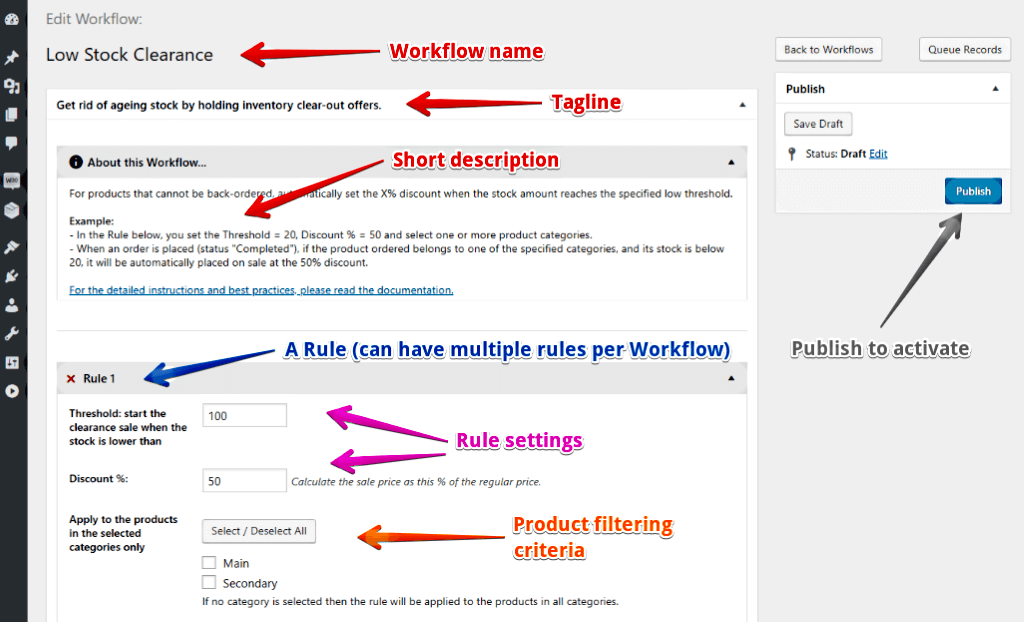
See Live Demo, download and register for upgrades:
https://woocommerce.com/products/woocommerce-assistant/
With a simple set of rules, it can schedule sales, tweak prices, run clearance events – all completely unattended.
See Live Demo, download and register for upgrades:
https://woocommerce.com/products/woocommerce-assistant/
2018-07-16
Service worker and 401 authorization
What happens
- The website area (/admin) is protected by an `htpasswd` authorization (Apache: AuthType Basic, Require valid-user, etc.).
- A "standard" service worker script is loaded at the home page, doing its usual stuff (install, fetch, cache).
- When you go to the protected page, you are not asked for the user/password, but see the "Not Authorized" message immediately.
- If you clear the service worker (in Chrome, F12 - Application - Clear storage), you can enter the admin area.
One way to cure
Your service-worker.js script probably has a piece of code that looks like:self.addEventListener('fetch', event => {
// Let the browser do its default thing
// for non-GET requests.
if (event.request.method !== 'GET') {
return;
}
Add the following lines immediately after that part:
    // Exclude admin panel.
    if (0 === event.request.url.indexOf("https://www.my-site.com/admin")) {
        return;
    }
It should help.
2018-06-21
Currency conversion in Google Sheets using the GoogleFinance function
Formula:
[A2] --> =INDEX(GoogleFinance("CURRENCY:USDCAD","price",A2),2,2)
Example:
2018-03-06
ACE Editor: submit, beautify and minify
A code example to use ACE Editor in HTML form, submit minified JS and CSS and beautify it.
Developed for use in the WPGlobus Multilingual WordPress plugin's options panel.
This is just a sketch. The server side is not shown.
Developed for use in the WPGlobus Multilingual WordPress plugin's options panel.
2018-01-04
Cygwin: Permissions 0660 for '~/.ssh/id_rsa' are too open.
Environment:
- MS Windows 8.1
- Cygwin 64bit
- ssh keys copied from somewhere and placed to ~/.ssh/
Problem:
@@@@@@@@@@@@@@@@@@@@@@@@@@@@@@@@@@@@@@@@@@@@@@@@@@@@@@@@@@@@ WARNING: UNPROTECTED PRIVATE KEY FILE! @
@@@@@@@@@@@@@@@@@@@@@@@@@@@@@@@@@@@@@@@@@@@@@@@@@@@@@@@@@@@
Permissions 0660 for '~/.ssh/id_rsa' are too open.
It is required that your private key files are NOT accessible by others.This private key will be ignored.
bad permissions: ignore key: ~/.ssh/id_rsa
Did not work:
- chmod 600 id_rsa
- chmod 700 .ssh
- Playing with Windows security panels
- Setting group to SYSTEM
- Everything else
Solution:
Found on Vineet Gupta's blog http://vineetgupta.com/blog/cygwin-permissions-bug-on-windows-8chgrp Users id_rsa
chmod 600 id_rsa
Now, all works. Thank you, Vineet!
2017-01-15
Cannot disconnect USB drive? Close the Task Manager!
Excuses
Yes, I am still using a WD "Passport" for downloaded movies. Copy on PC and connect the drive to TV's port. Yes, I know that I can stream. Yes, I have a good router. Never mind :-)
Oh, yes, I am still using Windows. Dear Mac users, I love you, too, but not as much as I love Bill Gates :)
<jokes aside>
Problem
"Windows cannot disconnect your USB drive". Close the programs, blah-blah-blah.
Obvious
Well, closing File Manager's windows surely helps.
Waiting a bit after the file is "copied" helps, too. I guess, some portions of it are not flushed to the drive yet (who knows, it's Windows).
Who cares?
My TV. Sometimes. Just does not see the files if the drive wasn't properly dismounted.
Not so obvious
The TASK MANAGER!
I believe, it monitors the disk activity. So, shut it down.
Not obvious at all
Atlassian's SourceTree.
Why? Who knows. I do not want to know. These days, I am using PHPStorm's Git or a command line. SourceTree is kept for some strange cases when I am not 100% sure what I just did... :-)
</off to watch>
Yes, I am still using a WD "Passport" for downloaded movies. Copy on PC and connect the drive to TV's port. Yes, I know that I can stream. Yes, I have a good router. Never mind :-)
Oh, yes, I am still using Windows. Dear Mac users, I love you, too, but not as much as I love Bill Gates :)
<jokes aside>
Problem
"Windows cannot disconnect your USB drive". Close the programs, blah-blah-blah.
Obvious
Well, closing File Manager's windows surely helps.
Waiting a bit after the file is "copied" helps, too. I guess, some portions of it are not flushed to the drive yet (who knows, it's Windows).
Who cares?
My TV. Sometimes. Just does not see the files if the drive wasn't properly dismounted.
Not so obvious
The TASK MANAGER!
I believe, it monitors the disk activity. So, shut it down.
Not obvious at all
Atlassian's SourceTree.
Why? Who knows. I do not want to know. These days, I am using PHPStorm's Git or a command line. SourceTree is kept for some strange cases when I am not 100% sure what I just did... :-)
</off to watch>
2016-11-27
ln -s on Windows? Use mklink for symbolic links !
I needed to make Apache server seeing a folder via a symbolic link - on MS Windows. The standard Windows' shortcuts look like links, but Apache does not see them...
Apparently, there is a way to make REAL symbolic links under Windows. (Must run command prompt as administrator).
For example:
mklink C:\etc\hosts C:\Windows\System32\Drivers\etc\hosts
results in
C:\>dir c:\etc
2013-01-02 21:37 <DIR> .
2013-01-02 21:37 <DIR> ..
2013-01-02 21:37 <SYMLINK> hosts [C:\Windows\System32\Drivers\etc\hosts]
The syntax for folders is:
mklink /D linkName target
Note: do not forget the drive letter (C:), or the link may not work in some situations.
Read more:
Apparently, there is a way to make REAL symbolic links under Windows. (Must run command prompt as administrator).
For example:
mklink C:\etc\hosts C:\Windows\System32\Drivers\etc\hosts
results in
C:\>dir c:\etc
2013-01-02 21:37 <DIR> .
2013-01-02 21:37 <DIR> ..
2013-01-02 21:37 <SYMLINK> hosts [C:\Windows\System32\Drivers\etc\hosts]
The syntax for folders is:
mklink /D linkName target
Note: do not forget the drive letter (C:), or the link may not work in some situations.
Read more:
- http://en.wikipedia.org/wiki/NTFS_symbolic_link
- http://www.techrepublic.com/blog/windows-and-office/be-more-efficient-and-better-organized-with-the-mklink-symbolic-link-tool/
- There is a convenient Windows Explorer extension:
http://schinagl.priv.at/nt/hardlinkshellext/linkshellextension.html
2016-09-06
"Disallow ia_archiver" does not remove pages from archive.org
The experiment (September 2016):
- A site exists since 2008 and has many snapshots on archive.org.
- The FAQ says:
You can exclude your site from display in the Wayback Machine by placing a robots.txt file on your web server that is set to disallow User-Agent: ia_archiver.
- Made the robots.txt as follows:
User-agent: ia_archiver
Disallow: /
- In a couple of days, indeed, instead of the site snapshots, a message saying that the archive is not available because of the robots.txt instruction. Success!
- Removed the robots.txt.
My expectations:
The old pages had disappeared from the archive completely, but the current one is now being crawled and included into the archive.
The reality:
All the old pages are back!
The bottom line:
Using the robots.txt, one can instruct Wayback Machine to stop displaying the site (which is exactly what the FAQ says!) but not to remove the pages from the archive.
2016-07-14
Cygwin and ANSI terminal
Problem
I see ANSI color sequences on Cygwin.Explanation
The default Cygwin.bat runs bash in a Window terminal, which does not support ANSI sequences, so you'll see the color codes instead of actual colors:$ codecept selfupdate
[37;41m [39;49m
[37;41m [Symfony\Component\Console\Exception\CommandNotFoundException] [39;49m
Solution
Edit the Cygwin.bat and make it look like:@echo off
C:
chdir C:\cygwin64\bin
mintty -
Now, it will run "mintty", which is a different terminal, and it will show the colors correctly.
(Be prepared for the possible changes in copy/paste with mouse clicks).
2016-05-31
A curious case of "you are not allowed" in WordPress
Register a custom taxonomy. Everything looks great, except for one "tiny" problem: any attempt to Add New results in immediate "You are not allowed" message!
Blame Yoast, of course! :)
He suggested "is_admin, but not DOING_AJAX". So, the "register taxonomy" was hooked on "not AJAX". Oooooopsi!
Re-hooked. Ta-da!
Blame Yoast, of course! :)
He suggested "is_admin, but not DOING_AJAX". So, the "register taxonomy" was hooked on "not AJAX". Oooooopsi!
Re-hooked. Ta-da!
2016-05-19
debug_backtrace and call_user_func in PHP 7
Before PHP 7, functions
Demonstration code Gist
call_user_func() and call_user_func_array() appeared in debug_backtrace() as separate entries. Since the version 7, they do not.Demonstration code Gist
2015-10-16
WordPress security : disallow author query
Friday afternoon. Looking at the access log... here are some "nice" requests. Happened at the same millisecond, and look very "hack-ish" to me.
54.80.2.64 - - [16/Oct/2015:18:46:25 +0000] "HEAD /?author=5 HTTP/1.1" 404 159 "-" "-"
54.80.2.64 - - [16/Oct/2015:18:46:25 +0000] "HEAD /?author=1 HTTP/1.1" 404 159 "-" "-"
54.80.2.64 - - [16/Oct/2015:18:46:25 +0000] "HEAD /?author=3 HTTP/1.1" 404 159 "-" "-"
54.80.2.64 - - [16/Oct/2015:18:46:25 +0000] "HEAD /?author=2 HTTP/1.1" 404 159 "-" "-"
54.80.2.64 - - [16/Oct/2015:18:46:25 +0000] "HEAD /?author=4 HTTP/1.1" 404 159 "-" "-"
54.80.2.64 - - [16/Oct/2015:18:46:25 +0000] "HEAD /?author=5 HTTP/1.1" 404 159 "-" "-"
54.80.2.64 - - [16/Oct/2015:18:46:25 +0000] "HEAD /?author=1 HTTP/1.1" 404 159 "-" "-"
54.80.2.64 - - [16/Oct/2015:18:46:25 +0000] "HEAD /?author=3 HTTP/1.1" 404 159 "-" "-"
54.80.2.64 - - [16/Oct/2015:18:46:25 +0000] "HEAD /?author=2 HTTP/1.1" 404 159 "-" "-"
54.80.2.64 - - [16/Oct/2015:18:46:25 +0000] "HEAD /?author=4 HTTP/1.1" 404 159 "-" "-"
Well, they all resulted in 404 Page not found...
...because I have this in .htaccess:
# - Do not allow author query to avoid real names exposure
RewriteCond %{QUERY_STRING} ^author=\d+
RewriteRule ^ - [R=404,L]
It's that simple. :)2015-09-29
WPGlobus multilingual plugin (Checking Facebook post embedding....)
WPGlobus will work with any WordPress theme. Some configuration is required to translate the theme options.
Posted by WPGlobus on Monday, September 28, 2015
Notes:
1. Do not need this:
<div id="fb-root"></div>
Facebook perfectly works without, and having multiple DIVs with the same id is wrong. So, just remove.
2. To see what's embedded, must not be logged to FB as a page, only as a person.
3. Do not expect any links from it. It's JS, iframe, etc. Link in the post: www.wpglobus.com - multilingual plugin for WordPress
2015-08-12
PHPStorm: mark a single file as excluded
PHPStorm allows to mark a folder as "Excluded" (Go to Project view, right-click on a folder and choose "Mark Directory as... Excluded". Then, all the files in that folder will be ignored by the PHPStorm when it looks for functions, constants, etc. So, for example, if you have an older versions of a library, in "archive" folder, you can exclude it, and Code Inspection will not refer to those older method definitions, constants, etc.
But what if you need to exclude just a single file? The only way I found was to mark it as a plain text:

It's particularly useful for WordPress projects: those two files
wp-admin/load-scripts.php
wp-admin/load-styles.php
have tons of "dummy" methods:
/**
* @ignore
*/
function add_filter() {}
- with no parameters or bodies. PHPStorm finds them, considers no params and a void return and issues useless inspection errors.
UPDATE:
There is an alternative solution, suggested by Slava Abakumov: add the file(s) to the Settings->Editor->File Types->Ignore...
The drawback is that the file disappears completely from the Project view, and even by typing its name, you won't be able to find it. Ignored completely. This can be quite inconvenient if you want to ignore a file, but still be able to edit it.

--------
A Pro-tip from the creators of WPGlobus Multilingual Plugin for WordPress
But what if you need to exclude just a single file? The only way I found was to mark it as a plain text:
It's particularly useful for WordPress projects: those two files
wp-admin/load-scripts.php
wp-admin/load-styles.php
have tons of "dummy" methods:
/**
* @ignore
*/
function add_filter() {}
- with no parameters or bodies. PHPStorm finds them, considers no params and a void return and issues useless inspection errors.
UPDATE:
There is an alternative solution, suggested by Slava Abakumov: add the file(s) to the Settings->Editor->File Types->Ignore...
The drawback is that the file disappears completely from the Project view, and even by typing its name, you won't be able to find it. Ignored completely. This can be quite inconvenient if you want to ignore a file, but still be able to edit it.
--------
A Pro-tip from the creators of WPGlobus Multilingual Plugin for WordPress
2015-08-06
makepot.php for single textdomain only
Here is a patch to the entry.php file that allows to ignore all strings that are not from a single textdomain.
Ugly. Hard-coded. Enjoy :)
Ugly. Hard-coded. Enjoy :)
2015-02-19
Codeception: XPath `...` is malformed!
Environment:
Codeception PHP Testing Framework v2.0.11Powered by PHPUnit 4.4.5 by Sebastian Bergmann.
Symptom:
* I am on page "/"* I click "Terms of Use"
XPath `Terms of Use` is malformed!
Cause:
$I->click( "Terms of Use" );
Cure:
$I->click(['link' => "Terms of Use"]);
From the documentation:
http://codeception.com/docs/modules/WebDriver#click// using strict locator
$I->click(['link' => 'Login']);
2014-08-19
WooCommerce: SQL to fix sorting by date
In one of the projects, I needed to import a product data from a non-WP website to WooCommerce.
After importing, the "Sort by newness" did not work correctly, because the post dates were all the same.
A simple SQL solved my problem:
After importing, the "Sort by newness" did not work correctly, because the post dates were all the same.
A simple SQL solved my problem:
2014-05-28
WordPress Tip: Export WooCommerce category list (SQL, CSV, Excel)
Run this SQL in phpMyAdmin, and then click Export link at the bottom to save as CSV for Excel or other format.
Note: tested only on one level of subcategories.
Gist revisions are welcome: https://gist.github.com/tivnet/d9cca4a4f4cfebe143bc
Note: tested only on one level of subcategories.
Gist revisions are welcome: https://gist.github.com/tivnet/d9cca4a4f4cfebe143bc
Subscribe to:
Posts (Atom)